Golf Leaderboard Graphics for Group Videos and Tournaments
2026-11-17 · Score Graphics
Put three or four golfers in a video and play for something, and you've got a tournament. The best group videos on YouTube feel like one: a mini major, a club championship, a season-long tour. What makes them feel that way, more than anything, is the leaderboard. A leaderboard overlay keeps everyone's score in view, not just the player on screen.
Here's when to show a leaderboard, what goes on it, and how to keep it right as the round goes on.
When to show the leaderboard
- After each holeAs the last player holes out: when the standings change.
- At the turnA recap, if every hole is too much.
- Before a second roundWho is leading going in.
- Before the last holeExactly what everyone needs.
In match play and skins the leaderboard is less needed for a two-player match, but it's great for a group skins game or a team event.
What goes on a leaderboard
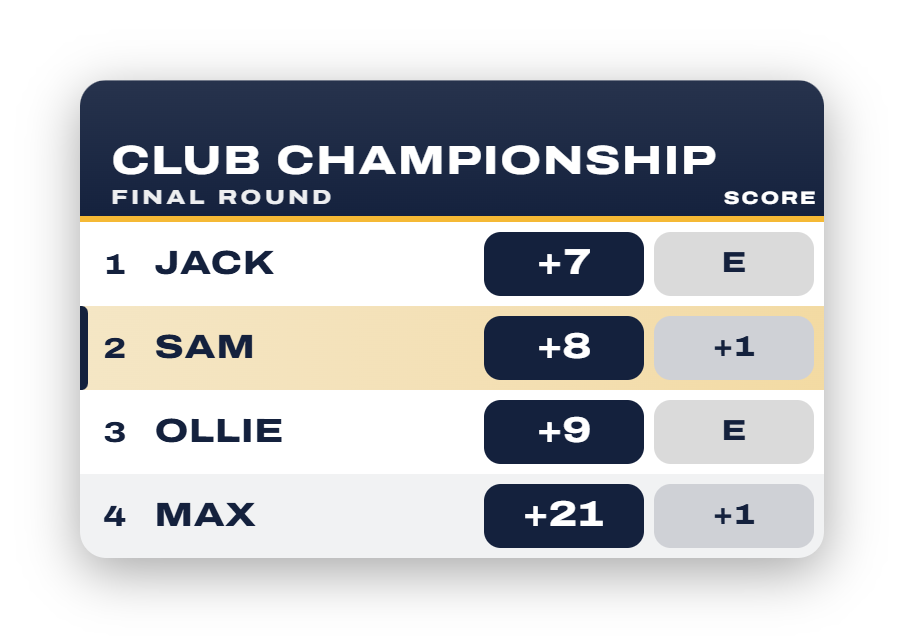
- Each player's place, with ties shown as T2, the way the pros do it.
- Their total to par, and with a multi-round event, today's score next to it.
- A title, the event's name ("The Club Championship") or the hole just played.
- Your logo, if the event has a brand.
Keep it to the players in the video. Four rows read in a second; ten don't on a phone.
Make it move
A static board after every hole works, but an animated one is far better. The best leaderboards in group videos do three things as a player holes out: the player's row lights up, their score rolls over to the new number, and the rows slide into their new places. Viewers see who moved and by how much without anyone having to say it.
Getting the standings right
A leaderboard is only as good as its numbers. Ties need the same place, a player who starts the round on a score needs it carried in, and in a Stableford event the most points leads, not the fewest strokes. One wrong number and the board on the 14th disagrees with the one on the 15th, and your comments section will notice.
Leaderboards in the Score Graphics Generator
On Pro, the Score Graphics Generator adds a leaderboard graphic to group rounds on designs that have one. It's built from the same scorecard as your score graphics, so it's always right:
- Updates as players hole outNumbers roll over and rows move to their new places.
- T2TiesShown the standard way.
- Starting scoresFor a second round or a season, with today's score beside it.
- Stableford and skinsRanked the right way, most first.
- The headerYour event's title and logo, or the hole just played.
- Your coloursIts own colour settings, matching your graphics by default.
Tips for tournament-style videos
- Name the event. "The Big Wedge Mini Major" or "The Fore Bros Major" gives the series an identity viewers come back for.
- Use the same design every time, so a returning viewer reads the board in a glance.
- Pair it with a scorecard after each hole for the player you're following, and a hole info card before the next.
- Give the leader a moment. Hold the board a beat longer when the lead changes hands.
 ScorecardsHow to Make a Golf Scorecard Graphic