Golf Match Play Graphics: How to Show Who's Up in Your Videos
2026-11-10 · Score Graphics
Match play is the format golf YouTube loves most. One player against another, or two against two, and every hole is its own little fight. It makes great video, but only if viewers can follow it. Lose track of who's up and a brilliant comeback just looks like four people hitting golf shots.
That's what match play graphics are for. Here's what to show, when to show it, and how to get it right on every shot without working it out by hand.
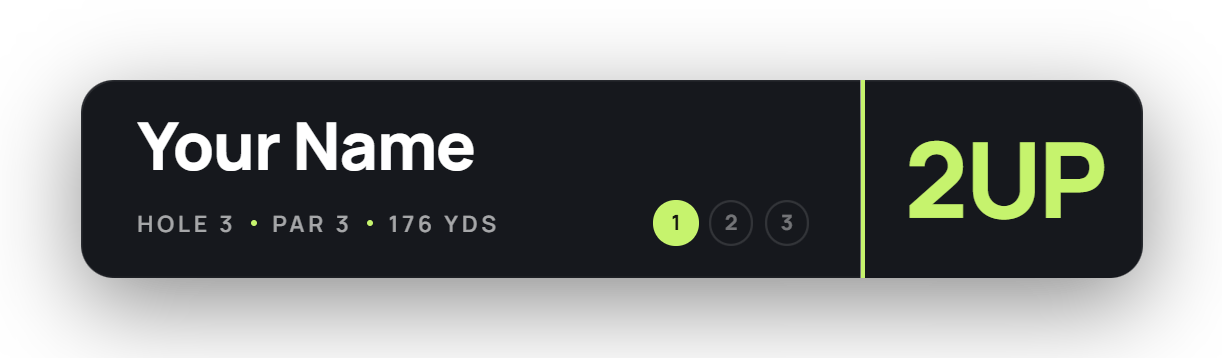
What a match play graphic shows
A stroke play graphic shows a score to par. A match play graphic shows the state of the match instead:
- AS (all square) when the match is level.
- 2UP or 1DN, how many holes a side is up or down.
- Dormie when a side is up by as many holes as there are left, so the other side can only halve the match at best.
- The result once it's decided: 3&2 means three up with two to play, and the match is over.
Like any score graphic, the graphic also carries the hole, par, yardage and shot number, so viewers always know where they are.
Show the match going into the hole
Six holes, three lead changes. A viewer who joins at the 6th should still see in a second that Rob is 1 up.
The most important rule: the status on screen should be the match going into the hole being played, and it should only change when the hole is finished. If a graphic shows 2UP on the tee because the leader is about to win the hole, you've spoiled your own video.
On the last putt of a hole, the status can change on screen as the ball drops, from 1UP to 2UP, or from 1UP back to AS. That's one of the most satisfying moments a match play video has, so it's worth getting right.
Singles and 2v2 best ball
1v1 singles is the simplest: one score per hole each, and the lower score wins the hole.
2v2 best ball (also called fourball) has two players on each side, each playing their own ball. A side's score on a hole is its better player's score. Graphics for best ball work best with the team named, so viewers know which side a player is on, and with both players' shots shown as they play.
For team formats like scrambles, where a team plays one ball, a stroke play graphic with the team's name usually reads better.
Shots given and received
When players of different abilities play each other, the better player gives shots. In a handicap match the weaker player gets their shots on the hardest holes, by stroke index: give six shots and they come on stroke index 1 to 6. Win a hole with a shot and it's a net win, even if both players made the same gross score.
This is where hand-made graphics go wrong most often: one shot put on the wrong hole and the match status is wrong from there to the end of the video.
The scorecard after each hole
A scorecard between holes gives viewers a breather and a recap. For match play, add a match column showing the status after each hole, so anyone who skipped ahead can catch up in a second. Stroke play numbers still go in the boxes, with birdies circled and bogeys boxed, because viewers love seeing how the holes were actually won.
 ScorecardsHow to Make a Golf Scorecard Graphic
Showing the stroke play score too
Some matches are played for the match and for bragging rights on the total. If you want both, show the match status on the graphic and the player's score to par in a smaller box next to it. Keep the match status the bigger of the two: it's the story of the video.
Let the generator work out the match
The Score Graphics Generator has match play built in. Pick Match play, choose 1v1 or 2v2 best ball, enter the scores, and it works out the match hole by hole: AS, UP, DN and dormie, then the result once it's decided. On animated designs the status changes on screen as the last putt of each hole drops.
- Shots given in singles go on the hardest holes by stroke index automatically.
- Team names for best ball show on the graphics and above each side on the scorecard.
- A stroke play box can show each player's score to par above the graphic as well, if you want both.
- The library designs all handle match play, so you can keep your channel's look.
Then export a graphic for every shot, and on Pro a scorecard after every hole with the match column filled in.
Tips for match play videos
- Say the status out loud, too. "One up going down 15" from a player on camera, matching the graphic, makes it stick.
- Don't skip conceded putts. If a putt is given, show the hole's result anyway so the status change isn't a surprise.
- Mark the turning points. A long hold on the graphic at dormie, or when a match goes back to all square, builds the drama.
- Keep the same design for every match in a series, so returning viewers can read it at a glance.
 Beginner's guideHow to Make a Golf Score Graphic